

How to Convert Markdown to TXT Online — Complete Guide for Developers
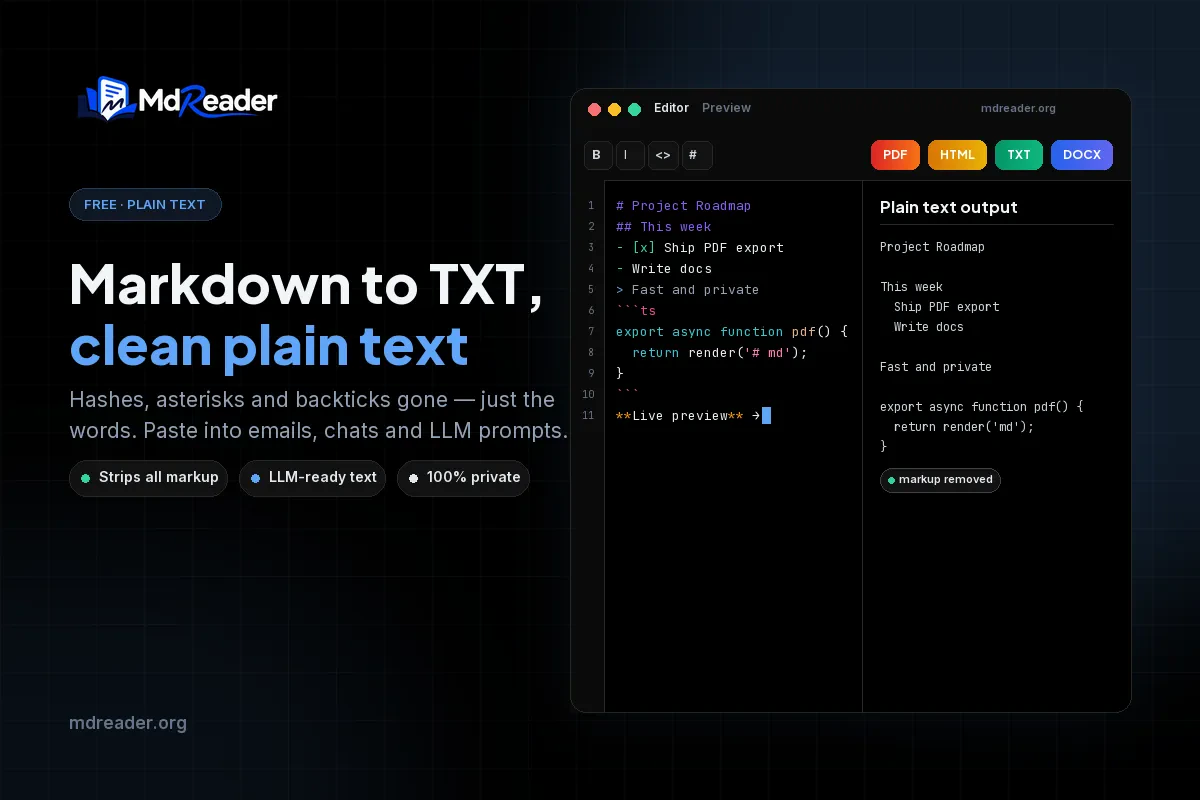
If you are a developer, technical writer, data scientist, or student, you likely spend a massive portion of your day writing in Markdown. You have meticulously crafted a specification, a README file, or a blog post draft complete with headings, bold text, lists, and code fences. But what happens when you need to paste that exact content into an email, feed it into a Large Language Model (LLM), or submit it to a legacy system that only accepts plain text?
Copying and pasting rendered Markdown from a preview window often leaves behind stray formatting, weird indentations, and broken fonts. On the other hand, manually deleting asterisks, underscores, and hash symbols from the raw source code is a massive waste of your valuable time. That is exactly where the need to convert Markdown to TXT online arises. A dedicated Markdown to TXT converter strips away all the Markdown syntax securely and leaves you with pristine, readable plain text that you can drop anywhere without a second thought.
In this comprehensive, developer-first guide, we will explore everything you need to know about how to convert Markdown to TXT online. We will cover the technical details of how syntax stripping works beneath the hood, why plain text is still king in many modern workflows, how to handle edge cases like code blocks, mathematical equations, and tables, and the fastest way to get the job done using MdReader.
Table of Contents
- What Does It Mean to Convert Markdown to TXT?
- Why Developers Convert Markdown to TXT Online
- How to Convert Markdown to TXT Online: Step-by-Step
- The Technical Mechanics of Markdown Stripping
- Code Examples: Formatting vs. Plain Text
- Handling Complex Elements: Mermaid Diagrams
- Handling Complex Elements: Tables and Math
- Markdown to TXT vs Markdown to PDF
- Best Practices for Writing Markdown for Text Export
- Frequently Asked Questions (FAQ)
- Conclusion
What Does It Mean to Convert Markdown to TXT?
Markdown is fundamentally a plain-text formatting syntax. Created by John Gruber in 2004, it was designed to be easily readable as raw text while being trivially convertible into structural HTML. A heading is denoted by a hash symbol (# Heading), bold text is wrapped in double asterisks (**bold**), and links are formatted with brackets and parentheses ([link text](url)).
To convert Markdown to TXT online means to systematically parse a Markdown document and remove every single formatting marker, leaving only the human-readable prose and code.
When you export a file to TXT, you are generating a universal, lightweight document that contains absolutely no formatting metadata. There are no fonts, no colors, no bold or italic styles, and no embedded images. It is the lowest-common-denominator format in computing, which guarantees that it will open natively on any operating system, in any text editor, and be processed by any script without throwing an encoding error or displaying rendering artifacts.
This is fundamentally different from other types of document conversion that you might be familiar with:
- Markdown to HTML: Converts syntax into semantic web tags like
<h1>,<strong>, and<ul>. - Markdown to PDF: Renders the syntax into a fixed-layout, visual document with typography, pagination, and high-resolution graphics.
- Markdown to TXT: Strips the syntax layer entirely, leaving the raw content intact.
If you are trying to share a document that looks beautiful, you want a PDF. But if you need to share pure data or content that must conform to strict input rules, you must convert Markdown to TXT online.
Why Developers Convert Markdown to TXT Online
You might wonder why anyone would want to convert Markdown to TXT and strip away formatting that they spent time intentionally creating. For developers, data scientists, and technical writers, plain text solves several persistent workflow problems.
1. Communicating in Email and Chat
Rich text editors in email clients (like Gmail or Outlook) and chat apps (like Slack or Microsoft Teams) are notoriously bad at pasting rendered Markdown. If you copy a rendered Markdown preview and paste it into an email, you often get massive header fonts, broken list indentations, and ugly background colors behind code blocks. By using an online tool to convert Markdown to TXT first, you ensure that your email looks clean, professional, and easily readable by your manager or client.
2. Prompting Large Language Models (LLMs)
When feeding documentation, specifications, or context into an LLM like ChatGPT, Claude, or Gemini, raw Markdown syntax can sometimes confuse the model or consume unnecessary context tokens. While LLMs are trained on Markdown, complex nested tables or extensive link references can dilute the core semantic message. Feeding them clean, plain text ensures the model focuses entirely on the meaning of the content rather than the formatting syntax.
3. Legacy Systems and Ticketing
Many older Content Management Systems (CMS), bug trackers (like Jira), and customer support ticketing systems have limited rich-text support. Pasting raw Markdown into a system that does not parse it leaves the recipient reading a confusing mess of asterisks, underscores, and backticks. Plain text guarantees the message is conveyed clearly, regardless of the platform.
4. Accessibility and Screen Readers
Assistive technologies and screen readers can sometimes struggle with raw Markdown syntax. Hearing a screen reader explicitly say "hash hash hash" for an H3 tag is a frustrating experience for visually impaired users. Converting the document to plain text provides a much smoother, more natural reading experience.
5. Automated Data Processing and NLP
Data scientists and machine learning engineers often need to process large corpora of documentation for Natural Language Processing (NLP) tasks. Before generating vector embeddings or performing sentiment analysis, the text must be normalized. Stripping Markdown syntax to convert Markdown to TXT is a crucial first step in building reliable training datasets.
How to Convert Markdown to TXT Online: Step-by-Step
Converting your Markdown files into pristine plain text is incredibly straightforward when you use the right tool. MdReader provides a seamless, privacy-first converter that handles the heavy computational lifting in seconds. Here is exactly how you can convert Markdown to TXT online.
Step 1: Open the Converter
Navigate to the MdReader website and access the dedicated Markdown to TXT converter. The tool loads instantly in your web browser. There is no software to install on your machine, no command-line interface to configure, and no account registration required.
Step 2: Input Your Markdown
You have two simple options for importing your content. You can either drag and drop an existing .md file directly into the browser window, or you can manually copy and paste your raw Markdown text into the interactive editor pane. The tool natively supports standard Markdown as well as GitHub Flavored Markdown (GFM).
Step 3: Review the Output
As soon as your content is loaded, the converter processes the text in real time. It identifies headings, lists, links, code blocks, and blockquotes, systematically stripping the syntax while preserving the underlying structure via line breaks and indentation. You can review the plain text in the output pane to ensure it perfectly meets your expectations.
Step 4: Export to TXT
Once you are satisfied with the result, simply click the "Download TXT" button. The file will be saved locally to your machine. Alternatively, you can click "Copy to Clipboard" to immediately paste the plain text into your email client, Slack channel, or AI prompt window.
Because the entire process happens client-side within your browser, your sensitive documentation is never uploaded to a remote server, ensuring complete enterprise-grade data privacy.
The Technical Mechanics of Markdown Stripping
When you convert Markdown to TXT online, the underlying engine is performing a series of complex parsing operations. It is not as simple as running a basic regular expression (Regex) script.
A naive Regex approach might try to remove all asterisks to clear out bold text. However, what if those asterisks are inside a critical code block? What if they are part of a mathematical equation? A robust converter must build an Abstract Syntax Tree (AST) of the document, differentiate between formatting markers and literal characters, and then safely traverse the tree to extract only the text nodes.
Here is how a high-quality converter handles different elements:
- Headings: The
#symbols are securely removed, but the text is preserved, often followed by a blank line to ensure readability. - Lists: The
-or*markers are usually preserved as plain-text bullet points, or converted to standardized indentation, ensuring the hierarchical list structure remains understandable. - Links: The
[text](URL)syntax is evaluated. The converter typically extracts the "text" portion and discards the "URL" to maintain conversational flow. - Blockquotes: The
>symbol is removed, but the quoted text remains perfectly intact.
Code Examples: Formatting vs. Plain Text
To effectively illustrate why you need a dedicated tool to convert Markdown to TXT online, consider how code blocks are handled. As developers, we rely heavily on fenced code blocks.
When you convert a document containing code, the converter must remove the triple backticks and the language identifier, but preserve the exact indentation and line breaks of the code itself.
Here is a TypeScript example of a theoretical Markdown processing function:
// This code block is preserved, but the Markdown fences are stripped in TXT export
function processMarkdown(input: string): string {
  const stripped = input.replace(/([*_~`])/g, '');
  return stripped.trim();
}

const result = processMarkdown("**Bold** and *italic* text");
console.log(result);
And here is a Python example demonstrating a simple file read operation:
def read_markdown_file(filepath):
    with open(filepath, 'r', encoding='utf-8') as file:
        content = file.read()
    return content

# The plain text output will keep this indentation perfectly
doc = read_markdown_file('README.md')
print("File loaded successfully.")
In the TXT output, the backticks and ts or python labels disappear entirely, but the underlying code logic remains perfectly legible.
Handling Complex Elements: Mermaid Diagrams
One of the most powerful features of modern Markdown environments is the ability to render dynamic diagrams directly from code using Mermaid.js. When you convert Markdown to TXT online, how should a visual diagram be handled?
Since a TXT file cannot inherently display images or rendered graphics, the converter will typically preserve the underlying Mermaid syntax as a raw text block. This allows the recipient to read the logic of the diagram even if they cannot see the visual flowchart.
Consider this Mermaid diagram tracking a document conversion workflow:
In a Markdown to PDF conversion, this block becomes a beautiful graphical flowchart. In a Markdown to TXT conversion, it safely remains as readable code, ensuring that the structural logic is not lost.
Handling Complex Elements: Tables and Math
Tables and mathematical equations are two other areas where a robust tool to convert Markdown to TXT online proves its worth over manual methods.
Markdown Tables
Markdown tables are built using pipes (|) and dashes (-). When converted to TXT, the tool must carefully decide how to represent this grid. Usually, the converter will align the columns using spaces to maintain a grid-like appearance in monospaced fonts, or it will flatten the data into a readable list.
Here is a simple comparison table of conversion methods:
| Feature | MdReader | Manual Regex | Copy/Paste |
|---|---|---|---|
| Strips Syntax | ✅ | ❌ | ❌ |
| Preserves Code | ✅ | ❌ | ⚠️ |
| Handles Tables | ✅ | ❌ | ❌ |
| Privacy First | ✅ | ✅ | ✅ |
LaTeX Math Equations
For engineers, data scientists, and students, LaTeX math blocks are absolutely essential. In a standard TXT file, high-fidelity math rendering is impossible. Therefore, the raw LaTeX is preserved so that the mathematical meaning remains perfectly intact.
A premium converter ensures that the $$ delimiters are either cleanly removed or preserved as context markers, depending on the configuration, so the recipient intuitively knows they are reading a mathematical formula.
Markdown to TXT vs Markdown to PDF
While converting Markdown to TXT online is perfect for generating raw, highly portable content, there are many enterprise scenarios where you need the exact opposite.
You should convert Markdown to TXT when:
- You are pasting text into a professional email.
- You are feeding detailed context to an LLM.
- You are storing raw data in a legacy database.
- You need the absolute smallest possible file size.
You should convert Markdown to PDF when:
- You are submitting a final technical report to a client or professor.
- You need to preserve exact visual layouts, typography, fonts, and colors.
- Your document includes complex rendered Mermaid diagrams, images, and LaTeX math.
- You need strict pagination, headers, and footers.
The beauty of a modern docs-as-code workflow is that your single Markdown source file can seamlessly serve both purposes. You can write your document once in the MdReader online editor, export a TXT version for your team's Slack channel, and export a beautifully formatted PDF version for the final executive summary.
Best Practices for Writing Markdown for Text Export
If you know that your end goal is to convert Markdown to TXT online, you can structure your original source document to ensure the best possible output.
- Keep Hierarchy Simple: Do not nest lists more than two or three levels deep. In plain text, deep nesting becomes incredibly difficult to read and track.
- Limit Inline Links: If you have a paragraph packed tightly with inline links, the TXT output will either drop the URLs (to preserve readability) or include them inline (which heavily clutters the text). Consider using reference-style links at the bottom of the document.
- Use Descriptive Alt Text: Since images cannot be rendered in a TXT file, the converter will often fall back to gracefully displaying the image's alt text. Ensure your alt text accurately describes the missing image.
- Avoid Complex HTML: Markdown allows you to embed raw HTML. When you convert to TXT, this HTML is often stripped out entirely. Stick to standard Markdown syntax to guarantee expected results.
Frequently Asked Questions
Is it safe to convert Markdown to TXT online?
Yes, absolutely. When you use a client-side tool like MdReader, the conversion process happens entirely within your web browser. Your Markdown files are never uploaded to a remote server, ensuring that your proprietary code, personal data, and confidential documentation remain 100% private.
Does converting Markdown to TXT remove my code blocks?
No. A high-quality converter will remove the Markdown code fences (the triple backticks) and the language identifier, but it will perfectly preserve the code inside the block, including all critical indentation and line breaks.
Can I convert Markdown to TXT in bulk?
Currently, most web-based tools process one document at a time for simplicity and performance. For processing hundreds of files simultaneously, developers often use command-line tools like Pandoc in a CI/CD pipeline. However, for everyday ad-hoc use, the online converter is significantly faster to access.
What happens to my Mermaid diagrams during conversion?
Because TXT files cannot render vector graphics, the converter will safely leave the raw Mermaid script intact in the text output. This ensures that the logical flow of the diagram is preserved and can be read or re-rendered later.
Will I lose my original Markdown file?
No. Converting Markdown to TXT online generates a brand new, isolated .txt file. Your original .md file remains completely untouched and safe on your hard drive.
Why not just use a Regex script to strip the formatting?
Writing a Regex script to remove Markdown seems easy until you encounter complex edge cases. Regex notoriously struggles with nested lists, code blocks containing asterisks, inline HTML, and complex table structures. A dedicated AST-based converter handles these edge cases flawlessly.
Is MdReader free to use?
Yes! MdReader offers free, unlimited conversions for developers and writers, whether you are exporting to TXT, HTML, or leveraging the Markdown to PDF tool.
Conclusion
Mastering your technical documentation workflow requires knowing not just how to write Markdown, but how to effectively distribute it. While formatted documents are beautiful, the universal compatibility of plain text is often exactly what a situation demands. Whether you are prepping an LLM prompt, drafting an important email, or archiving raw data, having a reliable way to convert Markdown to TXT online is a massive time-saver.
Instead of fighting with broken copy-paste formatting or writing fragile, error-prone Regex scripts, let a dedicated tool handle the parsing and stripping for you. You get clean, highly readable prose in seconds, and your original source file remains perfectly intact for future use.
Create beautiful Markdown documents with Mermaid diagrams, LaTeX equations, tables, and export them as PDF for free using MdReader.
\